
FREE WORDPRESS PLUGIN
Social Networks Auto Poster for WordPress
Publish once in WordPress. Share everywhere automatically.
Automatically publish your WordPress blog posts, pages, and WooCommerce products across 24 social networks. Customize how your posts look on every platform without leaving WordPress.
Connect all 24 networks for free with your own API keys, or use the Post.Social cloud API to publish without creating developer apps.

01 / CONNECT
Add your social accounts
Connect the social networks you use. Use your own developer API keys for free, or connect through Post.Social in 1 click without creating developer apps.
02 / CUSTOMIZE
Make each message yours
Customize your post template for each network using dynamic tags (%TITLE%, %EXCERPT%, %URL%), automatic hashtags, and custom images.
03 / PUBLISH
Let SNAP handle the sharing
Hit Publish in WordPress or set an auto-reposting schedule. SNAP delivers your posts in the background and logs direct links to every shared update.
SNAP Features
Everything you need to automate, customize, and schedule social media sharing from WordPress.
INSIDE THE PLUGIN
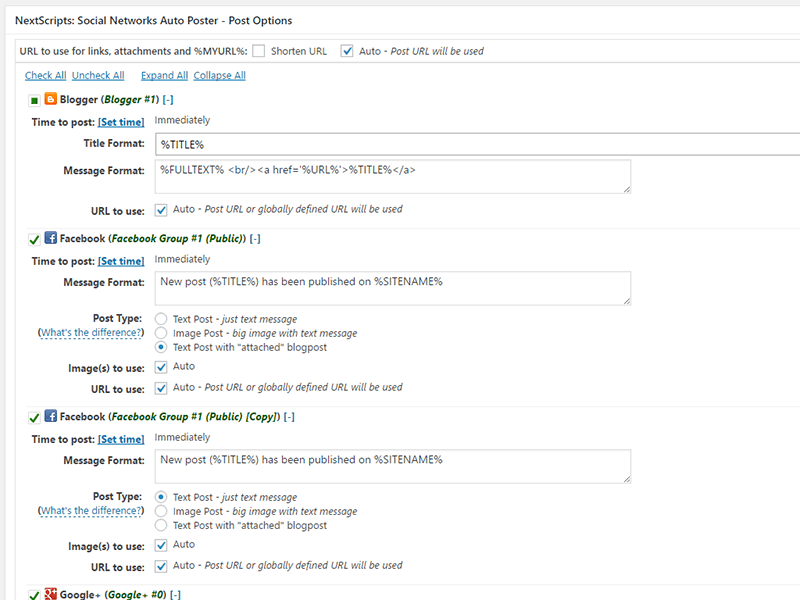
See the Publishing Controls
Preview and customize your social messages, filter which posts get shared, and schedule delivery times directly inside WordPress.


24 Supported Social Networks & Platforms
Connect all 24 platforms for free using your own developer API keys, or use the Post.Social cloud API to publish to the 8 major networks below without creating developer apps.
Major Social Platforms (Post.Social Cloud API or Your Own API Keys)
Publish through your accounts configured on Post.Social (1-click setup), or use your own custom developer app credentials.
Bluesky
Post.Social Cloud API or Bluesky App Password
Post.Social Cloud API or your own Facebook App (Pages)
Post.Social Cloud API or your own Meta App (Business & Creator)
Post.Social Cloud API or your own LinkedIn App (Profiles & Pages)
Post.Social Cloud API or your own Pinterest App (Boards)
Threads
Post.Social Cloud API or your own Threads App
X / Twitter
Post.Social Cloud API or your own X Developer API keys
VKontakte (VK)
Post.Social Cloud API or your own VK App (Profiles & Communities)
Direct Native Integrations (Included with SNAP)
Direct integrations using standard API keys, tokens, webhooks, or native protocols.
Blogger / Blogspot
Autopost full HTML content to your blog
Diigo
Auto-submit bookmarks with tags
Flickr
Post images directly to photostreams and sets
Google Business Profile
Publish updates to local listings via official OAuth
Instapaper
Auto-save bookmarks to your account
LINE
Broadcast messages to channels, groups, and rooms
LiveJournal & Dreamwidth
Auto-submit posts to personal journals and communities
Mailchimp
Distribute blog updates to specific email lists/campaigns
ok.ru (Odnoklassniki)
Share status updates, links, and photos to groups and pages
Submit text posts or links to your target subreddits
Scoop.it
Curate updates directly into your Scoop.it topics
Telegram
Instant message broadcasting to channels, groups, and chats
Tumblr
Publish text, rich media, and link cards via Tumblr Neue Post Format
vBulletin
Automatically create forum threads or posts
Publish microblog announcements and images
WordPress
Cross-post directly to remote WordPress sites and WordPress.com
GET STARTED
Install SNAP in a few minutes
In WordPress, open Plugins → Add New, search for NextScripts: Social Networks Auto-Poster, then install and activate it.
Open SNAP settings, connect an account, and send a test post before enabling automatic publishing.
Before you install
- WordPress 6.0 or newer
- PHP 7.4 or newer
- cURL and outbound HTTPS connections
- An account on each network you want to publish to
Use current, maintained WordPress and PHP versions. Direct integrations may require a developer app, API access, or account permissions from the network.
Frequently asked questions
Is SNAP free?
Yes. SNAP for WordPress is free to install and use. Direct integrations use your own apps, API keys, or account credentials. Any API access requirements are set by the individual social network.
Do I have to use Post.Social?
No. All 24 listed platforms support direct connections using your own credentials. Selected networks also offer optional 1-click connection through Post.Social, a separate service with its own plans.
Can I use SNAP on more than one site?
Yes. Install the free plugin on each WordPress site and configure the social accounts and publishing settings for that site.
Can I customize messages for each network?
Yes. Set a template per account and override it for individual posts. Use formatting tags, hashtags, links, and images appropriate for each destination.
Can I schedule posts or reshare older content?
Yes. Set a time or delay for individual social posts, and use the reposter to reshare existing WordPress content with filters and publishing windows.
Where can I get help?
Start with the installation guide and FAQ. You can also visit the support forums.
Will automated posting affect my social accounts?
Follow each network’s content policies, API requirements, and publishing limits. Avoid duplicate or unwanted messages and check delivery results when a network rejects a post.
FREE SNAP FOR WORDPRESS
Give every post a wider audience.
Connect your accounts, set your templates, and make social sharing part of your publishing routine.
